Exercise 4: Minimum Permissions for Common File Operations
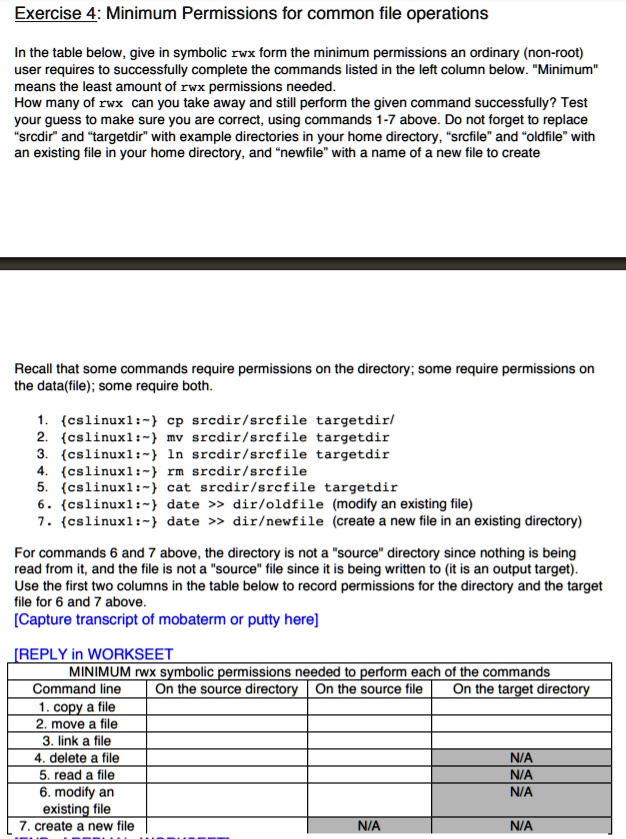
In the table below, give the minimum permissions an ordinary (non-root) user requires, in symbolic rwx form, to successfully complete the commands listed in the left column below. "Minimum" means the least amount of rwx permissions needed.
To ensure you are correct, use commands 1-7 above. Don't forget to replace "srcdir" and "targetdir" with example directories in your home directory, "srcfile" and "oldfile" with an existing file in your home directory, and "newfile" with the name of a new file to create.
Recall that some commands require permissions on the directory, some require permissions on the data (file), and some require both.
1. {cslinuxl:~} cp srcdir/srcfile targetdir/
2. {cslinuxl:~} mv srcdir/srcfile targetdir
3. {cslinuxl:~} ln srcdir/srcfile targetdir
4. {cslinuxl:~} rm srcdir/srcfile
5. {cslinuxl:~} cat srcdir/srcfile targetdir
6. {cslinuxl:~} date >> dir/oldfile (modify an existing file)
7. {cslinuxl:~} date >> dir/newfile (create a new file in an existing directory)
For commands 6 and 7 above, the directory is not a "source" directory since nothing is being read from it, and the file is not a "source" file since it is being written to (it is an output target). Use the first two columns in the table below to record permissions for the directory and the target file for 6 and 7 above. [Capture transcript of mobaterm or putty here]
REPLY in WORKSHEET: MINIMUM rwx symbolic permissions needed to perform each of the commands
Command line | On the source directory | On the source file | On the target directory
1. copy a file
2. move a file
3. link a file
4. delete a file | N/A
5. read a file | N/A
6. modify an existing file | N/A
7. create a new file | N/A | N/A