Lab15:
Page < 1 > of 2 ZOOM +
Create Python class files called "Employee.py" and "Timecard.py" that contain classes for the
Employee and Timecard classes. Each class should contain the following:
Employee Class:
• Constructor with employee number, last name, first name, and pay rate data fields.
• Getters and setters for the above data fields.
Timecard Class:
• Constructor with employee number, week ending date, and hours worked for Saturday-
Friday.
• Getters and setters for the above data fields.
• Instance method that gets the sum of the hours worked from each day of the week.
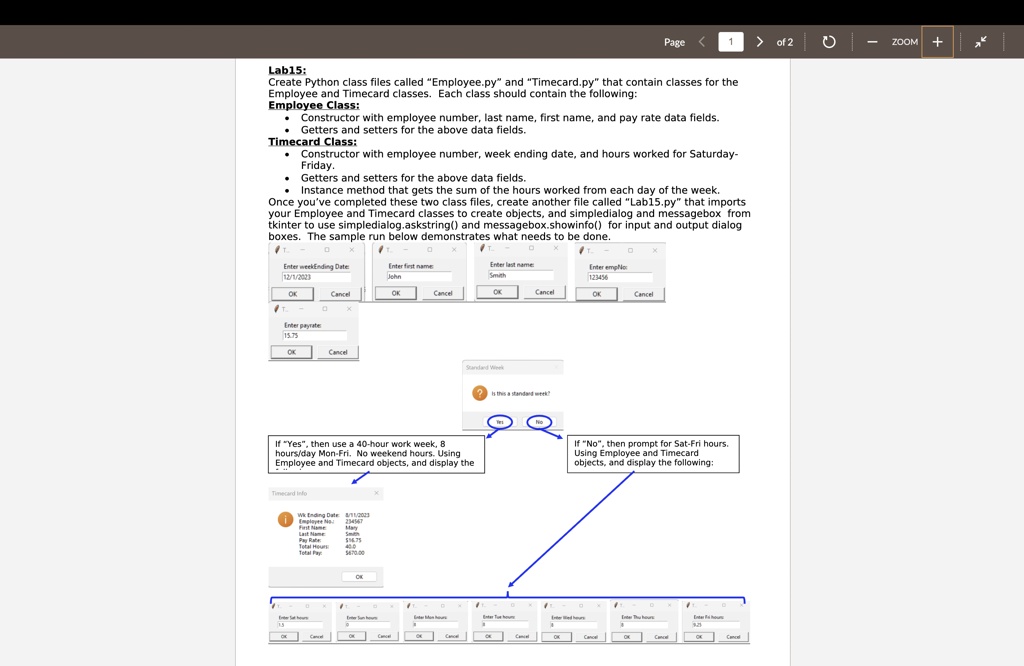
Once you've completed these two class files, create another file called "Lab15.py" that imports
your Employee and Timecard classes to create objects, and simpledialog and messagebox from
tkinter to use simpledialog.askstring() and messagebox.showinfo() for input and output dialog
boxes. The sample run below demonstrates what needs to be done.
Enter weekEnding Date:
12/1/2023
OK Cancel
Enter first name:
John
OK Cancel
Enter last name:
Smith
OK Cancel
Enter empNo:
123456
OK Cancel
Enter payrate:
15.75
OK Cancel
Standard Week
? Is this a standard week?
Yes No
If "Yes", then use a 40-hour work week, 8
hours/day Mon-Fri. No weekend hours. Using
Employee and Timecard objects, and display the
Timecard Info
Wk Ending Date:
Employee No.:
Last Name:
Pay Rate:
Total Pay:
8/11/2023
234567
Smith
$16.75
$670.00
OK
If "No", then prompt for Sat-Fri hours.
Using Employee and Timecard
objects, and display the following: