Texts:
Description: The sensor used in this robot is designed to detect the line that the robot is following. It is comprised of a pair of Light Emitting Diodes (LED1 and LED2) and a pair of photoresistors (R13 and R14). The amount of light reflected from a white surface will be significantly more than the light reflected by a black line. The 'sensor' subsystem in this case will provide information about which of the photoresistor pairs is over the line, and the control system will drive the vehicle such that it will turn to keep itself on the line.
This step will be to emulate the control system. As we discovered above, the hardware controller on our line-following robot implements a simple bang-bang controller. The objective of this controller is to keep the robot driving along the line. If the left sensor hits the line, the left motor will be turned off, and the robot will tend to turn left. If the right sensor hits the line, the right motor will be turned off, and the robot will tend to turn right. If neither sensor is on the line, both motors will turn on, and the robot will tend to move straight.
a. On Python, implement a function, ControlModel, which takes the signed distance of the vehicle's sensors, (dl, dr), and determines the desired wheel speeds, vl and vr, based on whether the left and right sensors are inside (left) or outside (right) of the ellipse.
b. Assuming that the robot starts at the origin (0, 0) and heading of 0 radians (i.e. facing along the x-axis), create a loop (or a spreadsheet if using Excel) that drives the robot along a path described by the ellipse we considered above (major axis a=12.5cm, b=7.5cm, thickness 1.5cm, and centered on the point (0, 7.5cm)). The robot should be on this line when it starts at the origin. Use a timestep of 0.01s to drive the vehicle model through approximately one minute of travel. Appendix A includes some pseudocode that should give you an idea of how you might structure your code. Experiment with how long it takes the robot to achieve two full revolutions around the circuit. Plot the resulting vehicle path on an (x, y) plot for which each point you plot should represent the vehicle's position at each timestep. You should also plot the vehicle heading as a function of time, or you may wish to combine these plots to show the full pose of the vehicle throughout its circuit. Does the robot achieve the desired elliptical path? Provide a brief description of the path of the robot and consider how the controller behavior could be improved.
c. As described at the outset, we wanted to develop our simulator so we could experiment with different controller designs. Our function, F(x, y), above tells us not only whether we are inside or outside of the ellipse but also how far inside or outside the ellipse we are. Rather than a bang-bang controller which turns the motors on or off, we can make the speed of the motors proportional to the distance from the ellipse. Implement a new controller, ControlModelProportional, which calculates the desired wheel speeds for the left and right wheels that are proportional to the distance that the left and right sensors are from the line. It should be possible to make a much smoother controller using this approach. Experiment with different values of the proportional parameter until you find a controller that exhibits smooth behavior.
Prepare a report outlining the development of your simulator and addressing each of the points above. Consider how you can best illustrate the behavior of your robot. Include figures to illustrate the output of the functions you have written and to show how effectively the robot follows the line.
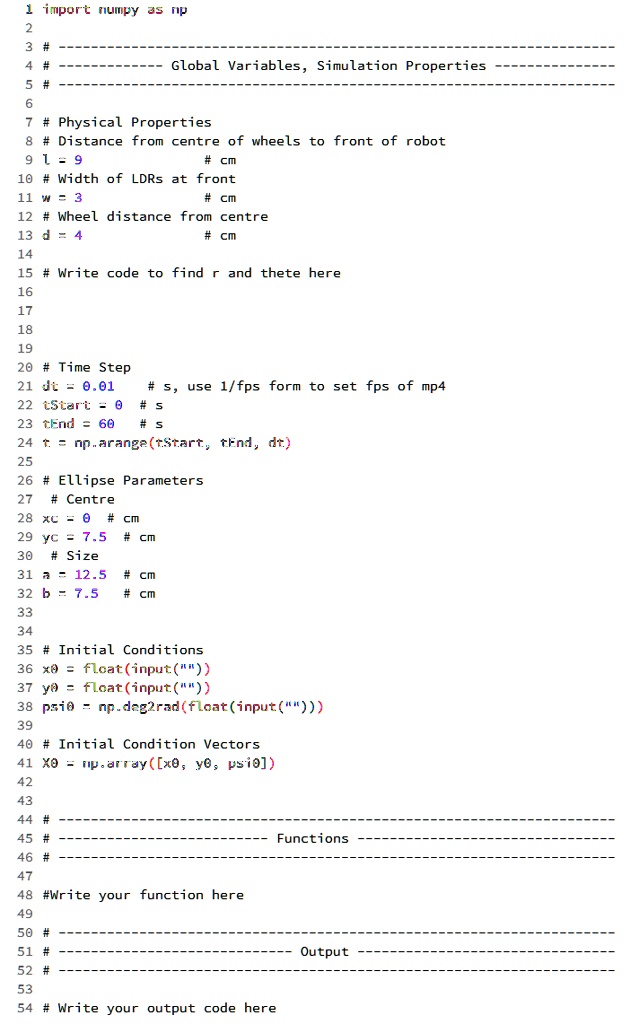
Please work on Python, and the ellipse is provided in the image.
1 import numpy as np
2
3 # Global Variables, Simulation Properties
4
5 # Physical Properties
6 # Distance from center of wheels to front of robot
7 l = 9 # cm
8 # Width of LDRs at front
9 w = 3 # cm
10 # Wheel distance from center
11 d = 4 # cm
12
13 # Write code to find r and theta here
14
15
16
17
18
19 # Time Step
20 dt = 0.01 # s, use 1/fps form to set fps of mp4
21 tStart = 0 # s
22 tEnd = 60 # s
23 t = np.arange(tStart, tEnd, dt)
24
25 # Ellipse Parameters
26 # Center
27 xc = 0 # cm
28 yc = 7.5 # cm
29 # Size
30 a = 12.5 # cm
31 b = 7.5 # cm
32
33
34 # Initial Conditions
35 x = float(input())
36 y = float(input())
37 psi = np.deg2rad(float(input()))
38
39 # Initial Condition Vectors
40 xo = np.array([x, y, psi])
41
42
43
44 # Functions
45
46
47 # Write your function here
48
49
50
51 # Output
52
53 # Write your output code here