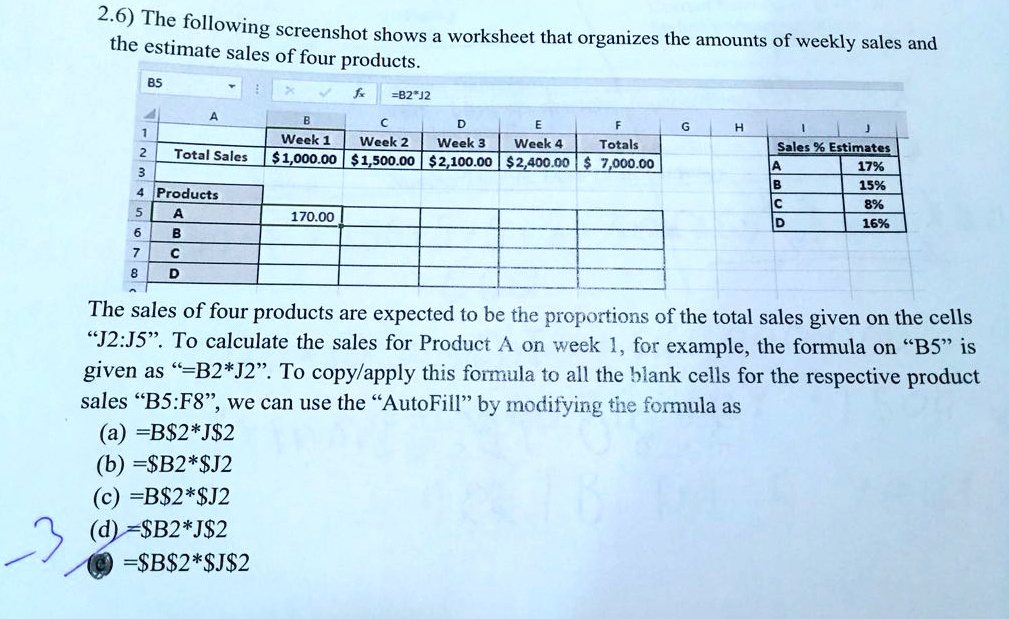
2.6) The following screenshot shows a worksheet that organizes the amounts of weekly sales and
the estimate sales of four products.
F
Totals
G
H
J
Sales % Estimates
A
17%
B
15%
C
8%
D
16%
BS
X
fx
=B2*J2
A
B
C
D
E
Week 4
1
Week 1 Week 2 Week 3
2
Total Sales
$1,000.00 $1,500.00 $2,100.00 $2,400.00 $ 7,000.00
3
4 Products
5
A
170.00
6
B
7
C
8
D
The sales of four products are expected to be the proportions of the total sales given on the cells
"J2:J5". To calculate the sales for Product A on week 1, for example, the formula on "B5" is
given as "=B2*J2". To copy/apply this formula to all the blank cells for the respective product
sales "B5:F8", we can use the "AutoFill" by modifying the formula as
(a) =B$2*J$2
(b) =$B2*$J2
(c) =B$2*$J2
(d) =$B2*J$2
=$B$2*$J$2