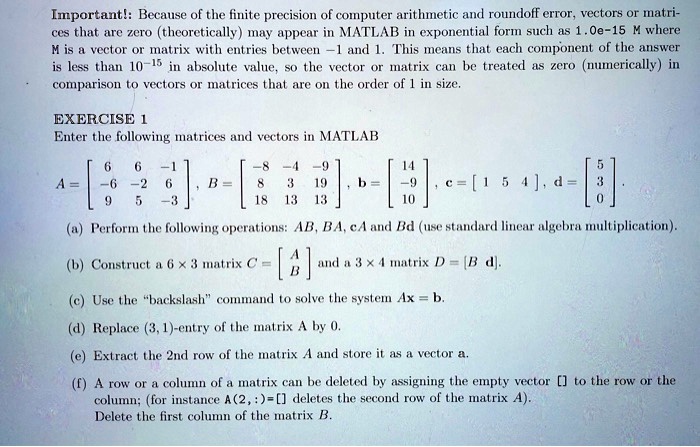
Important! Because of the finite precision of computer arithmetic and roundoff error, vectors or matrices that are zero (theoretically) may appear in MATLAB in exponential form such as 1.0e-15 M, where M is a vector or matrix with entries between -1 and 1. This means that each component of the answer is less than 10^-15 in absolute value, so the vector or matrix can be treated as zero (numerically) in comparison to vectors or matrices that are on the order of 1 in size.
EXERCISE 1: Enter the following matrices and vectors in MATLAB:
A = [6]
B = [8 19 18; 13 6 -3]
c = [1 5 4]
d = [6]
a) Perform the following operations: AB, BA, cA, and Bd (use standard linear algebra multiplication).
b) Construct a 6x3 matrix C.
c) Construct a 3x4 matrix D = [B d].
d) Use the backslash command to solve the system Ax = b.
e) Replace the (3,1)-entry of the matrix A by 0.
f) Extract the 2nd row of the matrix A and store it as a vector a.
g) A row or a column of a matrix can be deleted by assigning the empty vector [] to the row or the column; for instance, A(2,:) = [] deletes the second row of the matrix A. Delete the first column of the matrix B.