modify base on the code blow in c++#include <iostream>#include <vector>#include <fstream>#include <string> #define DEFAULT_DICT "dictionary1.txt"#define DEFAULT_OUTPUT_FILE "dict-updated.txt" int max_menu_option = 11;int max_dict_option = 5; // Function prototypesint getMenuChoice();void openAndLoadDictionary(std::vector<std::string> &dictionary, const std::string &filename);void printWordsToScreen(const std::vector<std::string> &dictionary); int main(){ std::vector<std::string> dictionary; // Create a vector to store words // Load the default dictionary openAndLoadDictionary(dictionary, DEFAULT_DICT); int choice; do { choice = getMenuChoice(); switch (choice) { case 1: printWordsToScreen(dictionary); std::cout << std::endl; break; case 2: std::cout << "Coming soon!" << std::endl; std::cout << std::endl; std::cout << std::endl; break; case 3: // Implement Find word, delete if found break; case 4: // Implement Swap two words break; case 5: // Implement Sort words (Bubble Sort) break; case 6: // Implement Sort words (Selection Sort) break; case 7: // Implement Find a word - Binary Search (assuming words are sorted alphabetically) break; case 8: // Implement Find word, insert if not found (assuming words are sorted alphabetically) break; case 9: // Implement Merge two dictionaries (will sort first) break; case 10: // Implement Load a dictionary (closes current dictionary) break; case 11: // Implement Write current dictionary to file break; default: std::cout << "Thank you! Bye!" << std::endl; break; } } while (choice != 0); return 0;} int getMenuChoice(){ int choice; do { std::cout << "--------------------------------------------" << std::endl; std::cout << "Options menu: " << std::endl; // Print menu options (1 to max_menu_option) for (int i = 1; i <= max_menu_option; i++) { if (i < 10) { std::cout << " (" << i << ") "; } else { std::cout << "(" << i << ") "; } switch (i) { case 1: std::cout << "Print words to screen"; break; case 2: std::cout << "Find a word (Linear Search)"; break; case 3: std::cout << "Find word, delete if found "; break; case 4: std::cout << "Swap two words"; break; case 5: std::cout << "Sort words (Bubble Sort)"; break; case 6: std::cout << "Sort words (Selection Sort)"; break; case 7: std::cout << "Find a word - Binary Search (assumes words are sorted alphabetically)"; break; case 8: std::cout << "Find word, insert if not found (assumes words are sorted alphabetically)"; break; case 9: std::cout << "Merge two dictionaries (will sort first)"; break; case 10: std::cout << "Load a dictionary (closes current dictionary)"; break; case 11: std::cout << "Write current dictionary to file"; break; default: break; } std::cout << std::endl; } std::cout << "Enter a number from 1 to " << max_menu_option << ", or 0 to exit: " << std::endl; std::cin >> choice; if (choice < 0 || choice > max_menu_option) { std::cout << "Error! Input must be a number between 1 and " << max_menu_option << ", or 0 to exit." << std::endl; } } while (choice < 0 || choice > max_menu_option); return choice;} void openAndLoadDictionary(std::vector<std::string> &dictionary, const std::string &filename){ // Open the file, read words into the dictionary vector std::ifstream file(filename); if (file.is_open()) { std::string word; while (std::getline(file, word)) { dictionary.push_back(word); } file.close(); std::cout << std::endl; } else { std::cerr << "Error: Unable to open the dictionary file." << std::endl; }} void printWordsToScreen(const std::vector<std::string> &dictionary){ for (const std::string &word : dictionary) { std::cout << word << std::endl; }}
Part II In this stage, we will implement menu items (10) & (11) - opening a different dictionary, and writing the current dictionary to a new file
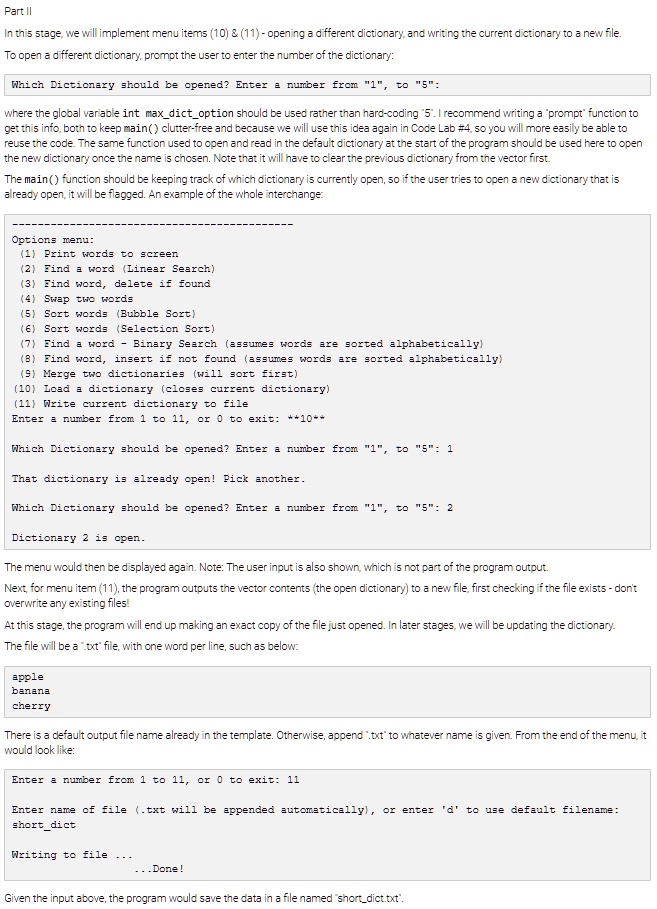
To open a different dictionary, prompt the user to enter the number of the dictionary:
where the global variable int max_dict_option should be used rather than hard-coding 5. I recommend writing a prompt function to get this info, both to keep main() clutter-free and because we will use this idea again in Code Lab #4, so you will more easily be able to reuse the code. The same function used to open and read in the default dictionary at the start of the program should be used here to open the new dictionary once the name is chosen. Note that it will have to clear the previous dictionary from the vector first.
The main() function should be keeping track of which dictionary is currently open, so if the user tries to open a new dictionary that is
Options menu: (i) Print words to screen (2) Find a word (Linear Search) (3) Find word, delete if found (4) SPIOM OMI dEMS (5) Sort words (Bubble Sort) (6) Sort words (Selection Sort) (7) (8) (9) Merge two dictionaries (will sort first) (10) Load a dictionary (closes current dictionary) (11) Write current dictionary to file Enter a number from i to ii, or 0 to exit: ++i0**
That dictionary is already open! Pick another.
Dictionary 2 is open.
The menu would then be displayed again. Note: The user input is also shown, which is not part of the program output.
Next, for menu item (11), the program outputs the vector contents (the open dictionary) to a new file, first checking if the file exists - dont overwrite any existing files!
At this stage, the program will end up making an exact copy of the file just opened. In later stages, we will be updating the dictionary. The file will be a .txt file, with one word per line, such as below:
apple banana cherry
There is a default output file name already in the template. Otherwise, append .txt* to whatever name is given. From the end of the menu, it would look like:
Enter a number from 1 to il, or 0 to exit: il
short_dict
Writing to file
...Done!
Given the input above, the program would save the data in a file named short_dict.txt.