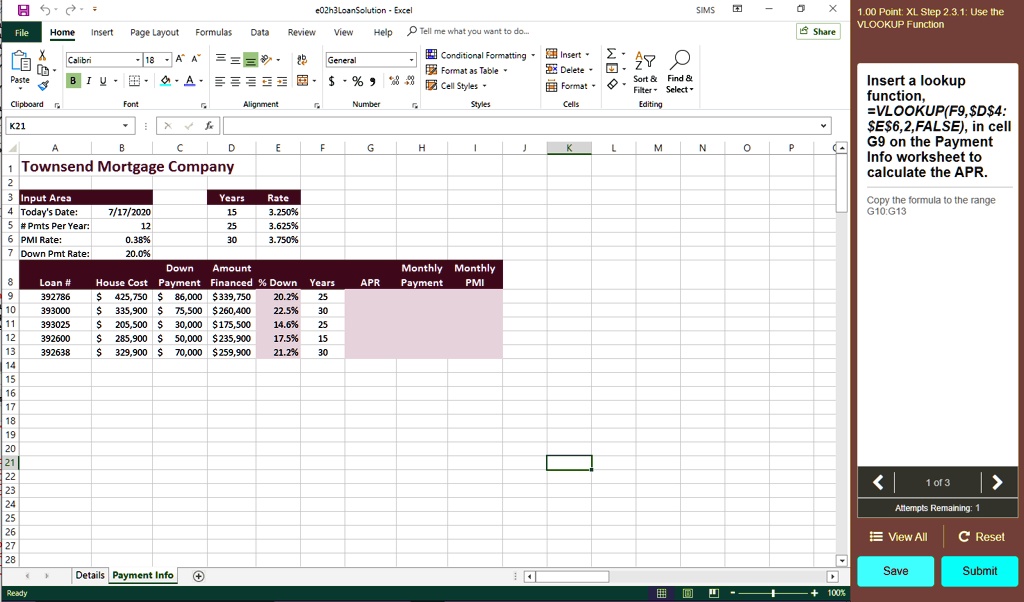
The directions for this question are on the right. I am pasting the given formula into the required cell of G9 but it is incorrect. What am I missing from this?
8
e02h3LoanSolution - Excel Data Review View Help Tell me what you want to do..
SIMS
X 1.00 Point: XL Step 2.3.1: Use the VLOOKUP Function Share
File
Home Insert Page Layout Formulas
X
Calibri 1A A == BIU A
General Conditional Formatting Insert . ZY Delete $% D. Sort & Find & Cell Styles Format Filter Select v 5 Number 5 Styles Cells Editing
Paste
Insert a lookup function, =VLOOKUP(F9,$D$4:$E$6,2,FALSE), in cell G9 on the Payment Info worksheet to calculate the APR.
Clipboard
Font XY fe
Alignment
K21
v
A
B
C
D Townsend Mortgage Company
E
F
G
H
M
N
p
K
3 Input Area Today's Date: 5#Pmts Per Year 6PMI Rate: 1 Down Pmt Rate:
Years 15 25 30
Rate 3.250% 3.625% 3.750%
Copy the formula to the range G10:G13
7/17/2020 12 0.38% 20.0% Down Amount House Cost Payment Financed % Down Years S 425,750 $86,000 $339,750 20.2% 25 $335,900 S 75,500 $260,400 22.5% 30 205,500 S 30,000 $175,500 14.6% 25 285,900 S 50,000 $235,900 17.5% 15 S 329,900 S 70,000 $259,900 21.2% 30
Monthly Monthly Payment PMI
8
Loan # 392786 393000 393025 392600 392638
APR
9 10 11 12 13 14 15 16
1 of 3
Attempts Remaining: 1
View All
C Reset
28
Details Payment Info
Save
+
Submit
Ready
100%