Description
Create an application that lets the user play the game of Rock, Paper, Scissors against the
computer. The program should work as follows:
1. When the program begins, a random number in the range of 1 through 3 is generated.
If the number is 1, then the computer has chosen rock. If the number is 2, then the
computer has chosen paper. If the number is 3, then the computer has chosen scissors.
(Do not display the computer's choice yet.)
2. The user selects their choice of rock, paper, or scissors. To get this input you can use
Button controls, or clickable PictureBox controls displaying some of the artwork that you
will find in the student sample files.
3. The computer's choice is displayed.
4. A winner is selected according to the following rules:
• If one player chooses rock and the other player chooses scissors, then rock wins.
(Rock smashes scissors.)
• If one player chooses scissors and the other player chooses paper, then scissors
wins. (Scissors cuts paper.)
• If one player chooses paper and the other player chooses rock, then paper wins.
(Paper wraps rock.)
• If both players make the same choice, the game must be played again to
determine the winner.
Make a method that generates a random number and returns the value.
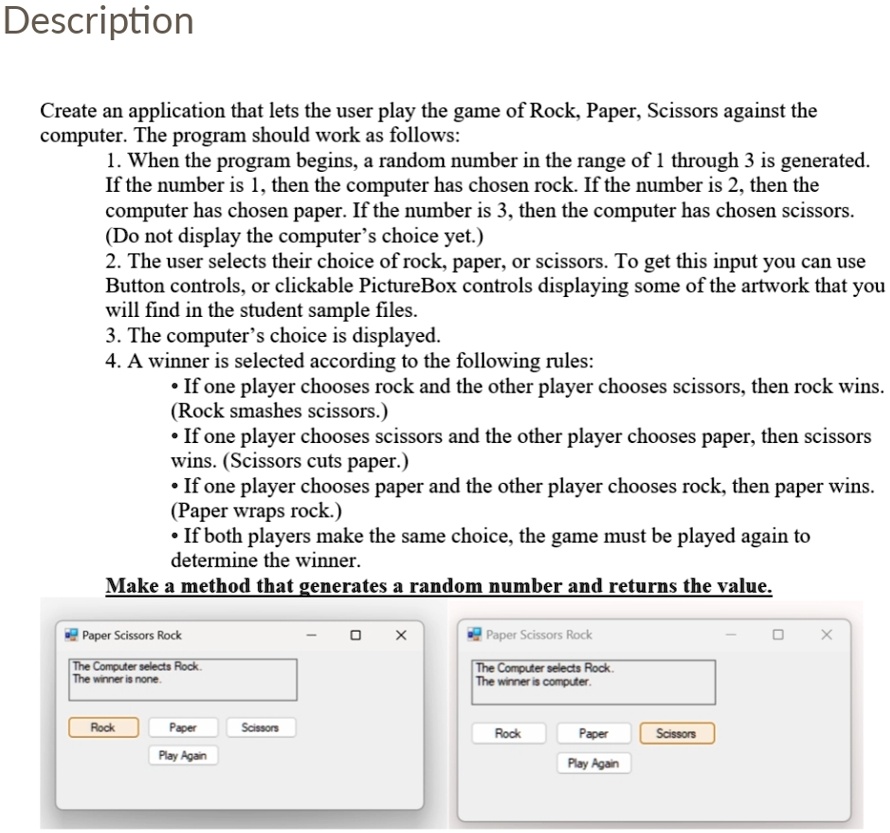
Paper Scissors Rock
The Computer selects Rock.
The winner is none.
Paper Scissors Rock
X
The Computer selects Rock.
The winner is computer.
X
Rock
Paper
Scissors
Play Again
Rock
Paper
Scissors
Play Again