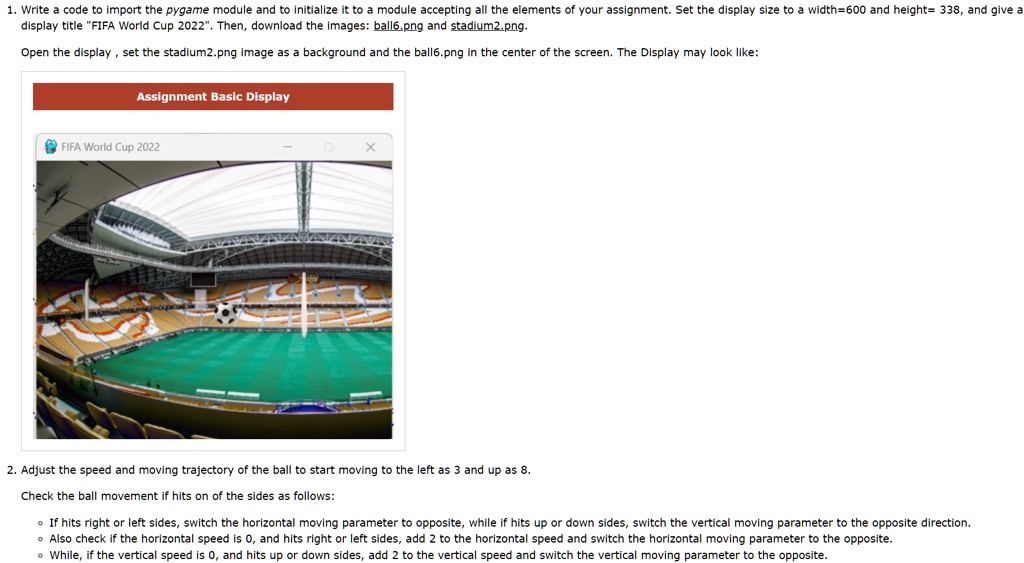
1. Write a code to import the pygame module and to initialize it to a module accepting all the elements of your assignment. Set the display size to a width=600 and height= 338, and give a
display title "FIFA World Cup 2022". Then, download the images: ball6.png and stadium2.png.
Open the display, set the stadium2.png image as a background and the ball6.png in the center of the screen. The Display may look like:
Assignment Basic Display
FIFA World Cup 2022
X
2. Adjust the speed and moving trajectory of the ball to start moving to the left as 3 and up as 8.
Check the ball movement if hits on of the sides as follows:
If hits right or left sides, switch the horizontal moving parameter to opposite, while if hits up or down sides, switch the vertical moving parameter to the opposite direction.
Also check if the horizontal speed is 0, and hits right or left sides, add 2 to the horizontal speed and switch the horizontal moving parameter to the opposite.
While, if the vertical speed is 0, and hits up or down sides, add 2 to the vertical speed and switch the vertical moving parameter to the opposite.