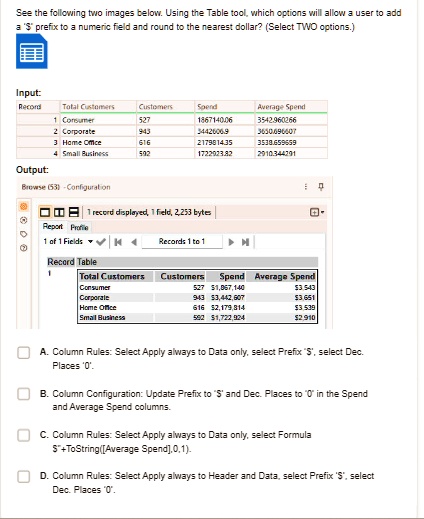
See the following two images below. Using the Table tool, which options will allow a user to add a '$' prefix to a numeric field and round to the nearest dollar? (Select TWO options.)
Input:
Output:
Browse (53) - Configuration
1 record displayed, 1 field, 2,253 bytes
Report Profile
1 of 1 Fields Records 1 to 1, M
Record Table
A. Column Rules: Select Apply always to Data only, select Prefix '$', select Dec. Places '0'.
B. Column Configuration: Update Prefix to '$' and Dec. Places to '0' in the Spend and Average Spend columns.
C. Column Rules: Select Apply always to Data only, select Formula "$"+ToString([Average Spend])
Input: Record Total Customers 1 Consumer 2 Corporate 3 Home Office 4 Small Business
Output: Browse (53) - Configuration
Customers 527 943 616 592
Spend 1867140.06 3442606.9 2179814.35 1722923.82
Average Spend 3542.960266 3650.696607 3538.659659 2910.344291
1 record displayed, 1 field, 2,253 bytes Report Profile 1 of 1 Fields Records 1 to 1
Record Table Total Customers Customers Spend Average Spend
Consumer 527 $1,867,140 $3,543
Corporate 943 $3,442,607 $3,651
Home Office 616 $2,179,314 $3,539
Small Business 592 $1,722,924 $2,910
A. Column Rules: Select Apply always to Data only, select Prefix '$', select Dec. Places 0.
B. Column Configuration: Update Prefix to $ and Dec. Places to 0 in the Spend and Average Spend columns
C. Column Rules: Select Apply always to Data only, select Formula $+ToString([Average Spend],0,1).
D. Column Rules: Select Apply always to Header and Data, select Prefix $, select Dec. Places 0.