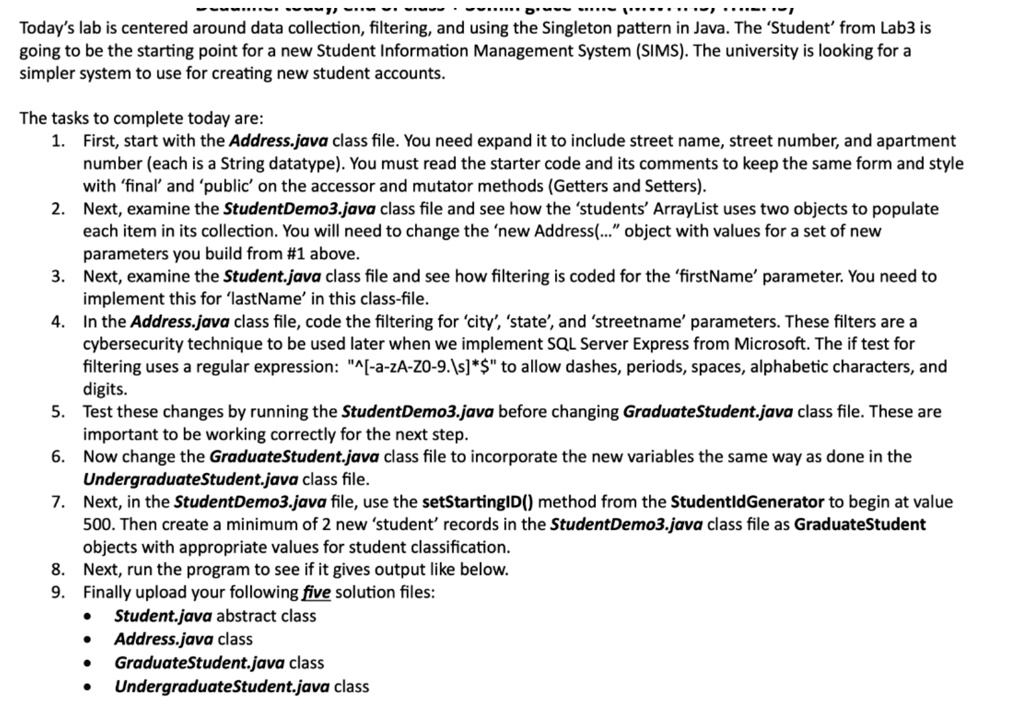
Today's lab is centered around data collection, filtering, and using the Singleton pattern in Java. The 'Student' from Lab3 is going to be the starting point for a new Student Information Management System (SIMS). The university is looking for a simpler system to use for creating new student accounts.
The tasks to complete today are:
1. First, start with the Address.java class file. You need to expand it to include street name, street number, and apartment number (each is a String datatype). You must read the starter code and its comments to keep the same form and style with 'final' and 'public' on the accessor and mutator methods (Getters and Setters).
2. Next, examine the StudentDemo3.java class file and see how the 'students' ArrayList uses two objects to populate each item in its collection. You will need to change the 'new Address(...' object with values for a set of new parameters you build from #1 above.
3. Next, examine the Student.java class file and see how filtering is coded for the 'firstName' parameter. You need to implement this for 'lastName' in this class file.
4. In the Address.java class file, code the filtering for 'city', 'state', and 'streetname' parameters. These filters are a cybersecurity technique to be used later when we implement SQL Server Express from Microsoft. The if test for filtering uses a regular expression: "*" to allow dashes, periods, spaces, alphabetic characters, and alphanumeric digits.
5. Test these changes by running the StudentDemo3.java before changing GraduateStudent.java class file. These are important to be working correctly for the next step.
6. Now change the GraduateStudent.java class file to incorporate the new variables the same way as done in the UndergraduateStudent.java class file.
7. Next, in the StudentDemo3.java file, use the setStartingID() method from the StudentIdGenerator to begin at value 500. Then create a minimum of 2 new 'student' records in the StudentDemo3.java class file as GraduateStudent objects with appropriate values for student classification.
8. Next, run the program to see if it gives output like below.
9. Finally, upload your following five solution files:
- Student.java abstract class
- Address.java class
- GraduateStudent.java class
- UndergraduateStudent.java class