Student's Name:
ID No.:
e) Bit Error Rate Measurement
Aim: to measure the bit error rate (BER) of binary phase shift keying.
To measure BER, you need to perform the following:
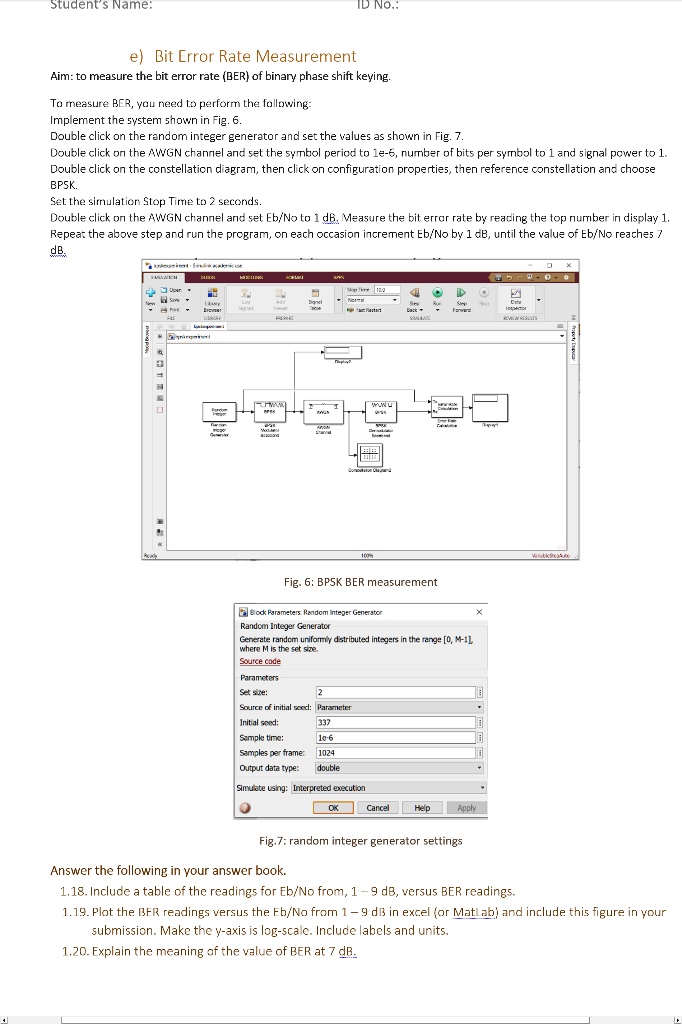
Implement the system shown in Fig. 6.
Double click on the random integer generator and set the values as shown in Fig. 7.
Double click on the AWGN channel and set the symbol period to 1e-6, number of bits per symbol to 1 and signal power to 1.
Double click on the constellation diagram, then click on configuration properties, then reference constellation and choose
BPSK.
Set the simulation Stop Time to 2 seconds.
Double click on the AWGN channel and set Eb/No to 1 dB. Measure the bit error rate by reading the top number in display 1.
Repeat the above step and run the program, on each occasion increment Eb/No by 1 dB, until the value of Eb/No reaches 7
dB.
Fig. 6: BPSK BER measurement
Block Parameters: Random Integer Generator
Random Integer Generator
Generate random uniformly distributed integers in the range [0, M-1],
where M is the set size.
Source code
Parameters
Set size:
2
Source of initial seed: Parameter
Initial seed:
337
Sample time:
1e-6
Samples per frame:
1024
Output data type: double
Simulate using: Interpreted execution
Fig. 7: random integer generator settings
Answer the following in your answer book.
1.18. Include a table of the readings for Eb/No from, 1-9 dB, versus BER readings.
1.19. Plot the BER readings versus the Eb/No from 1-9 dB in excel (or Matlab) and include this figure in your
submission. Make the y-axis is log-scale. Include labels and units.
1.20. Explain the meaning of the value of BER at 7 dB.