Following the MASR Cache simulation tutorial and draft a program with a loop of "lw"s (looping for n times, you decide the value of n). and compare the miss rate calculated with the miss rate from simulation. Provide your analysis and screen shot of Mars simulation. if you run the code all at once, you will get the final state of the cache and hit rate.You will probably benefit the most from run the code step by step to see exactlywhere the hits and misses are coming from.Translate the following C code to MIPS assembly. Use label “main” as entranceand the label “loop” as the starting point of “for loop” memory access.(a) Lab4_a.asmint array [256] = {}; int x = 0; int y = 0;for(int i=0; i<10; i++){x = array[0]; // Mem[0x10010000]}.dataarray: .space 2048 # max array size specified in BYTES.text########################main:la $s0, array # addr of arrayaddi $s1, $s0, 256 # S1 addr array+...addi $t1, $0,0 # counter of loopload:lw $t0, 0($s0) # array[index]addi $t1, $t1,1blt $t1,10,load # access 10 timesend:li $v0,10 # exitsyscall Set the cache simulation tool and the memory visualization tool to perform thefollowing simulations for1) direct mapped cache, 8 words capacity, 8 sets, block size=1 word.2) 2-way set associative cache, 8 words capacity, 4 sets, set size = 2 blocks,block size =1 word.3) direct mapped cache, 8 words capacity, 4 sets, block size = 2 words. Run your using the above three different caches.Mark the set index of each different memory addresses using different caches1)Direct Map BlockSize=1 Lower 8 bits of addrMem[0x10010000] ... 0000 0000Mem[0x10010020] ... 0010 0000Mem[0x10010004] ... 0000 01001)2-way BlockSize=1 Lower 8 bits of addrMem[0x10010000] ... 0000 0000Mem[0x10010020] ... 0010 0000Mem[0x10010004] ... 0000 01001)Direct Map BlockSize =2 Lower 8 bits of addrMem[0x10010000] ... 0000 0000Mem[0x10010020] ... 0010 0000Mem[0x10010004] ... 0000 0100
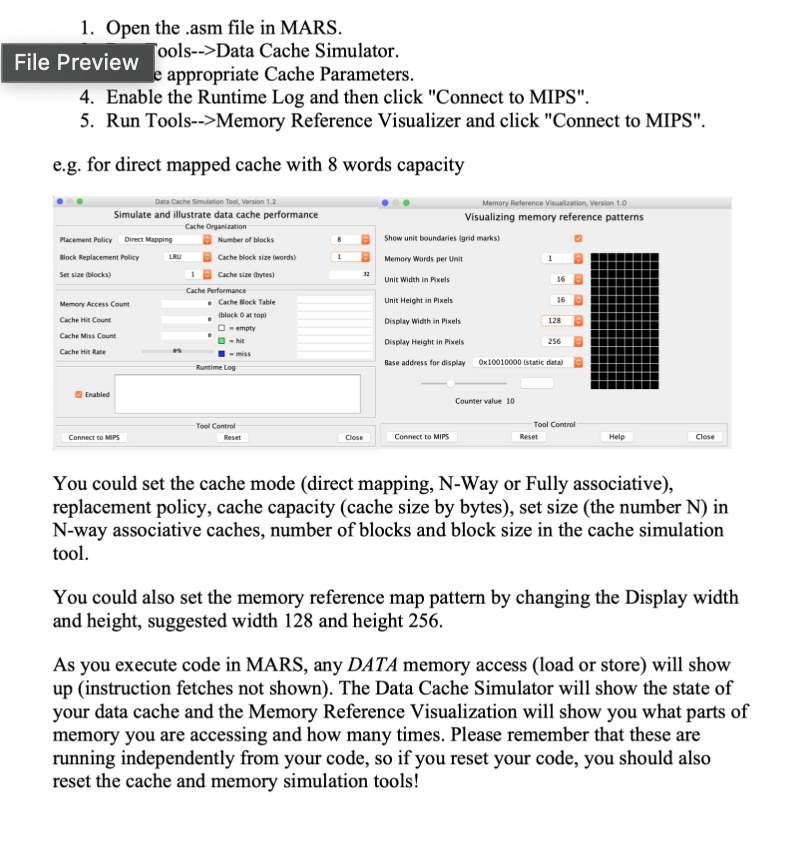
1.Open the .asm file in MARS ools-->Data Cache Simulator. File Preview e appropriate Cache Parameters 4. Enable the Runtime Log and then click "Connect to MIPS" 5. Run Tools-->Memory Reference Visualizer and click "Connect to MIPS"
e.g. for direct mapped cache with 8 words capacity
Simulate and illustrate data cache performance
Visualizing memory reference patterns
Number of blocks Cache block size (words)
Show unit boundaries (grid marks)
LRU
Memory Words per Unit
(blocks)
Unit Width in Pixels
16
Cache Bock Tabl
Jnit Height in Pixels
Display Width in Pixels
128
Display Height in Pixels
256
Rese
Connect to MIPS
Reset
Help
You could set the cache mode (direct mapping, N-Way or Fully associative), replacement policy,cache capacity cache size by bytes),set size (the number N in N-way associative caches, number of blocks and block size in the cache simulation tool.
You could also set the memory reference map pattern by changing the Display width and height, suggested width 128 and height 256.
As you execute code in MARS,any DATA memory access (load or store) will show up (instruction fetches not shown). The Data Cache Simulator will show the state of your data cache and the Memory Reference Visualization will show you what parts of memory you are accessing and how many times. Please remember that these are running independently from your code, so if you reset your code, you should also reset the cache and memory simulation tools!