The link to get chapter 09 project 02.
Using JQuery is fine.
Project 9.2
1. Examine chapter09-project02.html. You will add event handlers to the thumbnail images and to the larger image. You will not need to make any changes to the supplied markup or CSS.
2. All of your event handlers must execute only after the page has loaded.
3. You are going to add a click event handler to each of the thumbnail images. When the smaller image is clicked, your code will show the larger version of the image in the <ng> element within the <figure> element. This same event handler must add the title attribute of the clicked thumbnail image to the <figcaption> element. Your event handler must use event delegation (i.e., the click event handler will be attached to the <div> element and not to the individual <img> elements).
4. You must also add event handlers to the mouseover and mouseout events of the <figure> element. When the user moves the mouse over the larger image, then you will fade the <figcaption> element to about 80% opacity (its initial CSS opacity is 0% or transparent/invisible). When the mouse moves out of the image, the <figcaption> should fade back to invisibility.
5. You can animate (for instance, a fade is an animation) any CSS setting (such as opacity) in JavaScript by setting its style.transition property. For instance, in JavaScript, setting an object's opacity to its next setting across one second.
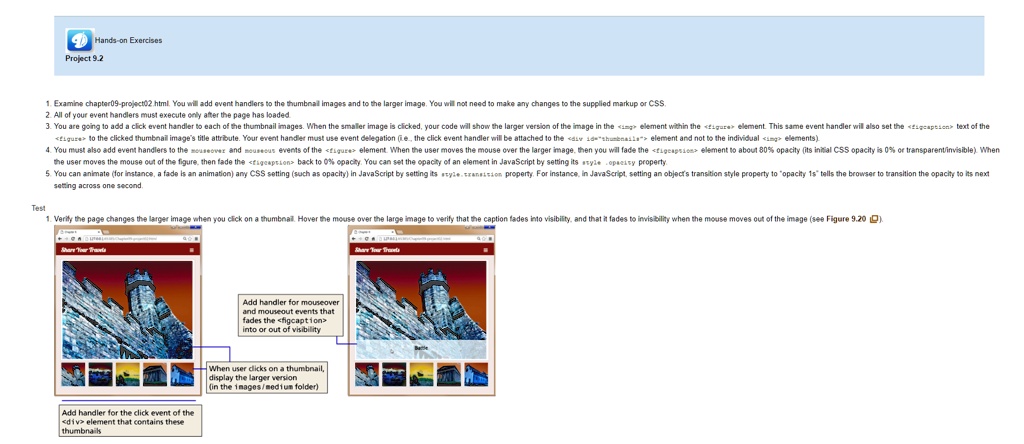
Test 1. Verify the page changes the larger image when you click on a thumbnail. Hover the mouse over the large image to verify that the caption fades into visibility and that it fades to invisibility when the mouse moves out of the image (see Figure 9.20).
Add handler for mouseover and mouseout events that fades the <figcaption> into or out of visibility.
When the user clicks on a thumbnail, display the larger version (in the images/medium folder).
Add handler for the click event of the <div> element that contains these thumbnails.